

Case summary
Tracker:
Affiliate network:
Offer vertical: Sweepstakes
GEO: Philippines
Conversion type: MT Flow
Payouts: 0,90 $
Having arrived to Moscow Affiliate conference 2017 one day before the main event, I went to defoo.cc party where I had some talks with colleagues and heard a lot of complaints about ExoClick’s conversion rates which had sunk recently, so everybody were completely unhappy about it. By the way my situation wasn’t a different one as I noticed this decline too. But I have found a new feature (or maybe I just wasn’t paying attention to it as my CR was ok) which interested me a lot, so I decided to examine it more tightly.
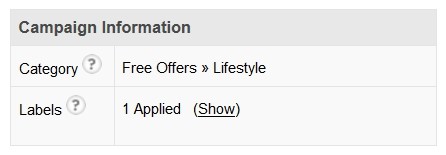
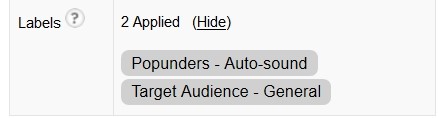
After having your campaign approved you get some kind of labels (as above), by which a pub should decide whether to give you traffic or no. Everything is clear when you look at the category: if you are working with games, the category will be “games”, but it’s not that easy with labels. As far as we are working with mobile, we can find different labels there, such as:
Then we go to the Sites Targeting, choose Zone Targeting – Include zones, and after going through moderation we can see which pubs have no intention to give their traffic to us and why:
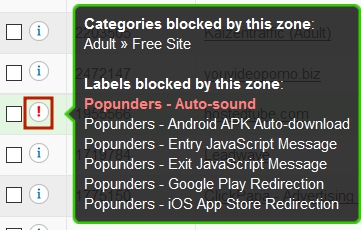
You can see the example on the screen: it’s a pub that won’t give us traffic because it has restrictions on Auto-sound, while we have it on our landing page. There are also some label limitations:
- Auto downloads of APK files for Android are forbidden;
- Alerts (Entry and Exit Java-Script messages)
- Google Play and iOS App Store redirections
Will you get profit from this pub? If you strive to make an LP which will follow the rules below, the answer still will be rather yes or no. You will see an example from a real campaign below
And now let’s move to the second case. At the beginning I launched a campaign using the following targeting:
- Language (English in our case)
- All carriers
- Mobile and Tablets
- All other targeting options remained default
First of all I tested my LP which had the best CR on sweepstakes. It easily passes moderation on ExoClick.
After moderation I checked whether the most lead generating pubs weren’t blocking me. As soon as I made sure that everything was ok I decided to make a test launch for 24 hours without changing any of campaign settings. Due to having small payouts and quite enough traffic I managed to see an evaluable picture on the other day:

Yeah, I managed to get a plus by only one carrier right away. BUT, while examining statistics I noticed that a couple of most “fat” pubs stopped giving traffic to me
Having looked in the Labels tab I saw, that one of the pubs didn’t allow vibration while the other one blocked me because of Alert (Entry JavaScript Message).
Here are some pictures to make it clear.
1. An Alert (Entry JavaScript Message) looks like this:
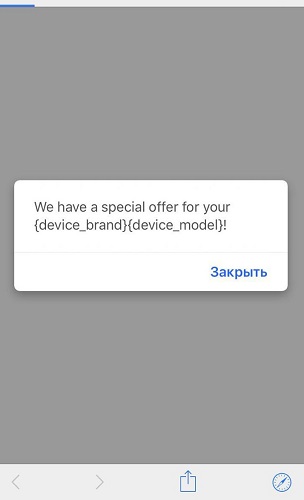
2. Vibration (navigator.vibrate script) – with the help of this script your phone begins to vibrate infinitely while loading a landing.
What about the solution? I decided to add these two profitable pubs into a whitelist and show ads only on them:
· (exo_white_1) Pub #1 wasn’t giving traffic to me because of vibration on my LP. I replaced vibration with Auto-sound
· (exo_white_2) Pub #2 wasn’t giving traffic because of Alert (Entry javaScript Message). I decided not to replace it with something and just removed the script.
You can see the result (after 24 hrs.) on the screenshot below:

As you can see a simple adjust didn’t work in case with the second pub, but there were fewer traffic as well, so I decided not to bother myself working with this pub further (though I could try).
I optimized my campaign in every 24-48 working hours. During the main campaign I removed pubs using my own rule: pubs with LP Clicks > 900 and 0 leads were blacklisted. This simple rule helped me to keep about 40% ROI.
All the numbers below include click loss (loss of traffic between its source and tracker). The main campaign (exo) had clickloss rate of 9%, exo_white_1 had about 6-7%.
In the end we have the following picture:

*on the previous screenshot, the costs on exo_white_2 campaign are 6,79, but on this screenshot you can see 7$. This happens because some clicks reach a little later, but after all they count even if the campaign is stopped;
The main idea of the article which I would like to state on: focusing on traffic source is useful.
Offtop. While preparing this article I was chatting with ExoClick support and wanted them to give me a list of pubs by blocking labels, but, unfortunately, such list doesn’t exist (